
SAP Servers
SAP training servers
Batch-ready SAP landscapes with per-student logins, module-wise access and trainer controls for institutes and corporate learning teams.
- 24-hour demo
- Secure remote login
- Expert support
In short
What is an SAP training server?
An SAP training server is an SAP environment sized for a batch of learners, where each participant gets a separate user and workspace so classroom exercises do not collide. Institutes and corporate trainers use it for scheduled batches; ServerFY sets up the users before the batch starts and keeps the system available for the whole programme.
Built for real SAP work
What you get
Logins for every student
Bulk user creation with names, roles and module access set up before day one.
Trainer controls
Trainer users with wider authorisation to demonstrate and reset scenarios.
Batch-sized capacity
Sized for your batch so screens stay responsive during live classes.
Term-based billing
Pay for the length of the batch, extend when the next one starts.
Specification
- Users
- From 10 to 500 concurrent student logins
- Platform
- SAP S/4HANA or ECC 6.0 with IDES-style data
- Access method
- SAP GUI / Fiori launchpad over secure remote login
- Availability
- 24×7 with monitored uptime
- Backups
- Daily snapshots, restore on request
- Activation
- Usually within a few working hours
Good fit for
- Training institutes and academies
- Corporate upskilling batches
- College and university SAP labs
- Freelance trainers running cohorts
From a live environment
How the access actually looks
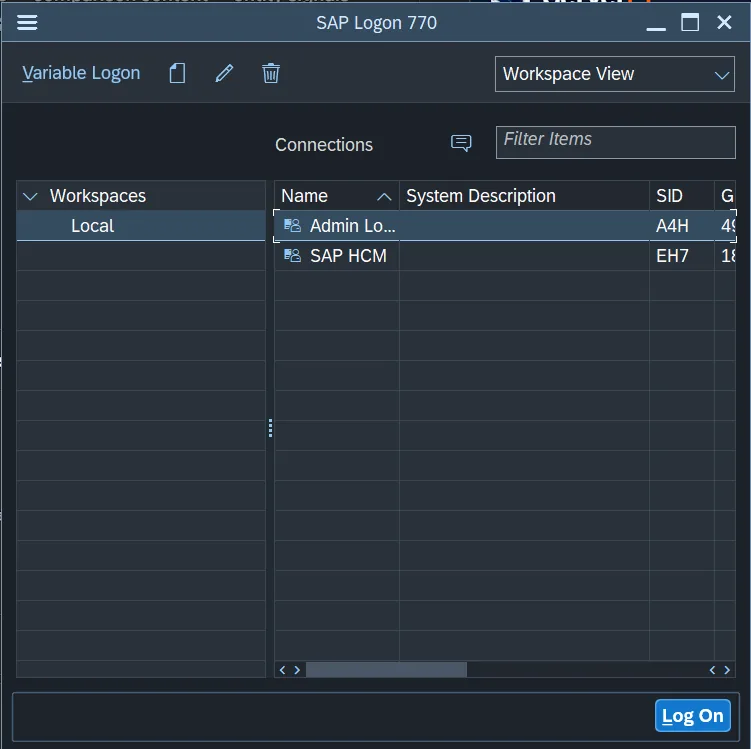
This is the SAP Logon window on a ServerFY connection. You add the entry once and log on from your own machine — no VPN client, no local SAP installation, no virtual machine to maintain. Server addresses, user names and passwords are never published; they are sent to you privately at handover.
- 1Install SAP GUI 7.70 (or later) on your own Windows, macOS or Linux machine.
- 2Open SAP Logon and add a new connection entry for the system we issue.
- 3Enter the application server, instance number and system ID from your handover mail.
- 4Log on with your client, user and password — then change the password on first login.
Included as standard
Everything below comes with every environment
Activated in hours
Most environments are handed over the same working day, with credentials and a quick-start note.
Secure remote access
Encrypted logins, isolated users and clean deletion when your environment ends.
Daily backups
Snapshots every day with restore on request, so a wrong transport never costs you a week.
Human support
Reach an SAP infrastructure engineer on call, WhatsApp or email — not a ticket queue.
Need to know
Common questions
How soon can I start working?
Most environments are handed over the same working day. Larger dedicated landscapes or big training batches can take a little longer, and we confirm the timeline before you pay.
Can I extend or upgrade later?
Yes. You can extend the duration, add users or move to a larger environment at any time, and your existing work carries over.
Is this suitable for production use?
No. These are learning, training, development, testing and demo environments — they are not intended for running live business data.
Not Sure Which SAP Server You Need?
Tell us your SAP module, version and requirement. Our SAP experts will help you choose the right environment.
SAP infrastructure desk
Typical reply within business hours
- Module and version guidance
- Right-sizing RAM, CPU and storage
- Trainer and batch setups
- Dedicated landscape scoping